Remote startup video
The left pane shows HP Startup Menu, a WebRTC live-stream label and controls for screenshots, OCR and remote control.
COMMUNITY / BIOS TESTING
BIOS interaction, test cases and screenshot evidence in one console.
A community user shared KVM-Orch, a test console built around BliKVM for HP PC BIOS testing. It combines the target startup screen, a test suite and an execution log.
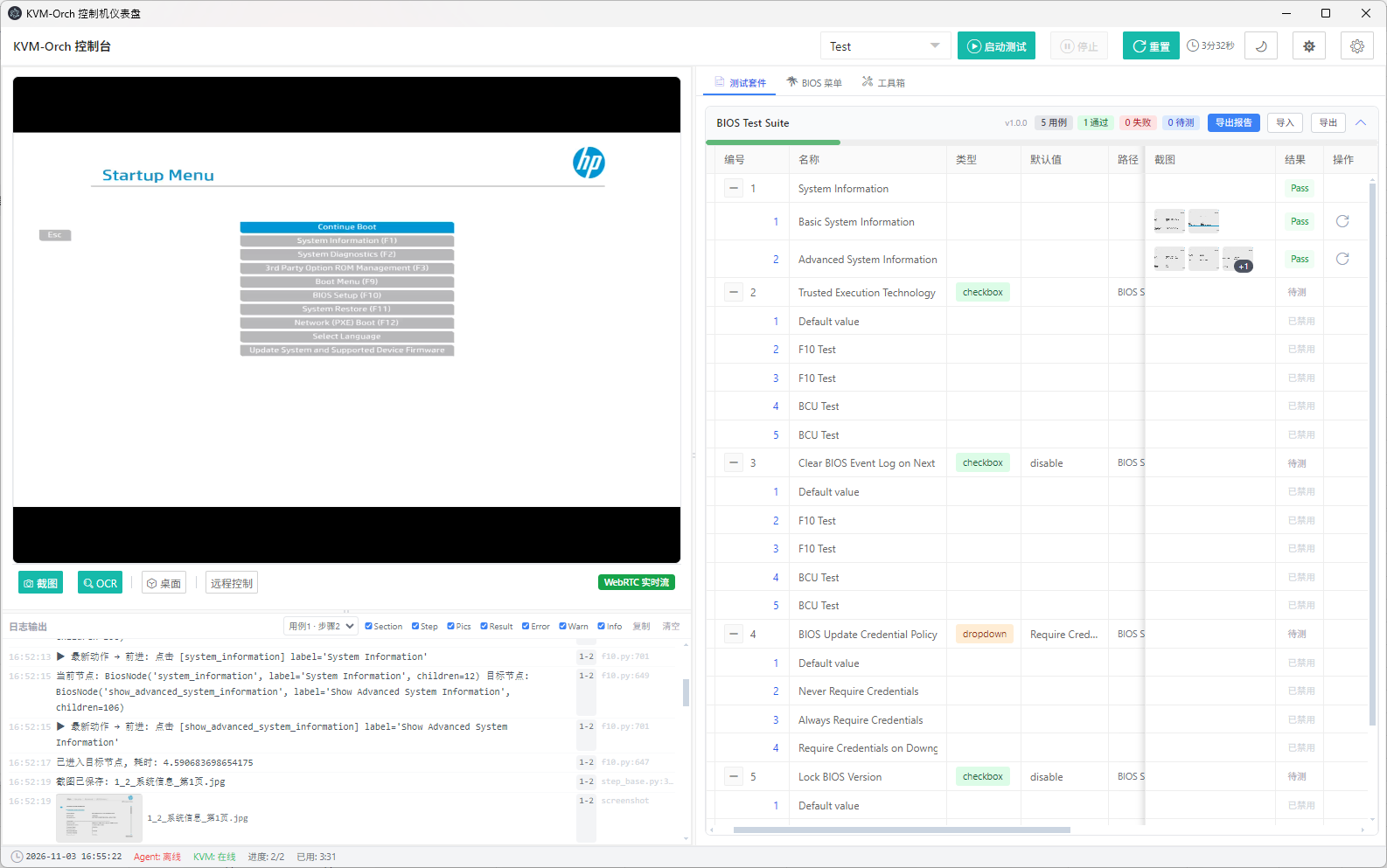
The left pane shows HP Startup Menu, a WebRTC live-stream label and controls for screenshots, OCR and remote control.
BIOS Test Suite groups cases by feature and shows types, defaults, screenshots and results. Two System Information subitems display Pass.
Logs record navigation, reaching target nodes and saving screenshots. Thumbnails associate test records with visual evidence.
BliKVM provides remote video and keyboard/mouse control. The user’s test software organizes cases, interprets the interface, orchestrates actions and gathers results. KVM-Orch is a user-built integration, not the standard BliKVM interface.