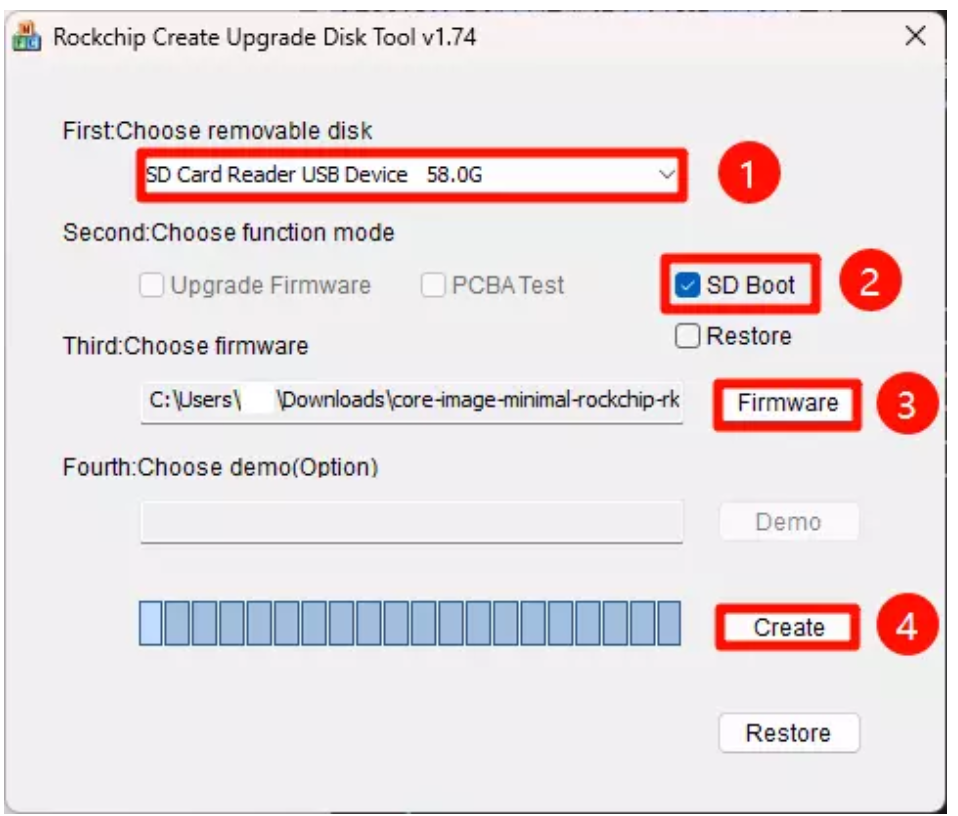
SDDiskTool
System Image
Hardware Preparation
You need to prepare the following hardware devices in advance:
- MicroSD card
- MicroSD card reader
Install System
You need to use the official Rockchip SDDiskTool Download to flash the system image to the MicroSD card.
Caution
Installing the system will format the MicroSD card. Please backup important data in advance!
SDDiskTool
SDDiskTool currently only supports Windows system, please use it under Windows system.
After downloading SDDiskTool, unzip it and double-click SDDiskTool.exe to use it.
Hardware Connection
Insert the MicroSD card into the MicroSD card reader, then insert the MicroSD card reader into the computer.
Flash System Image
Follow the steps below to use SDDiskTool to flash the system image to the MicroSD card. If the SD card has been flashed before and has multiple partitions, you need to clear all partitions and format it first.
- Select MicroSD card device
- Select SD Boot option
- Select the system image file built by Yoct project
- Click create button to start flashing the system image