C778 HDMI to MIPI CSI-2 module
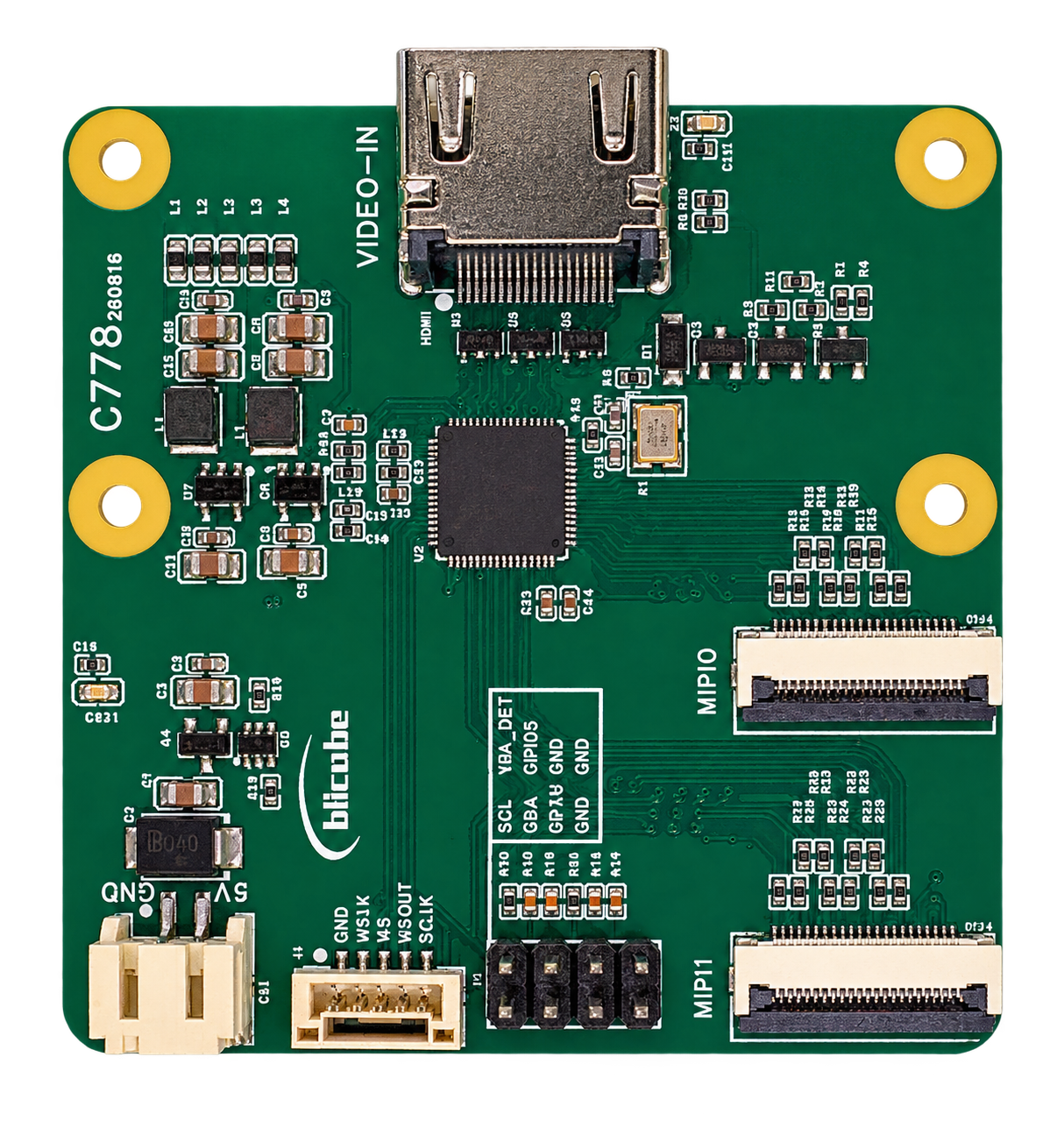
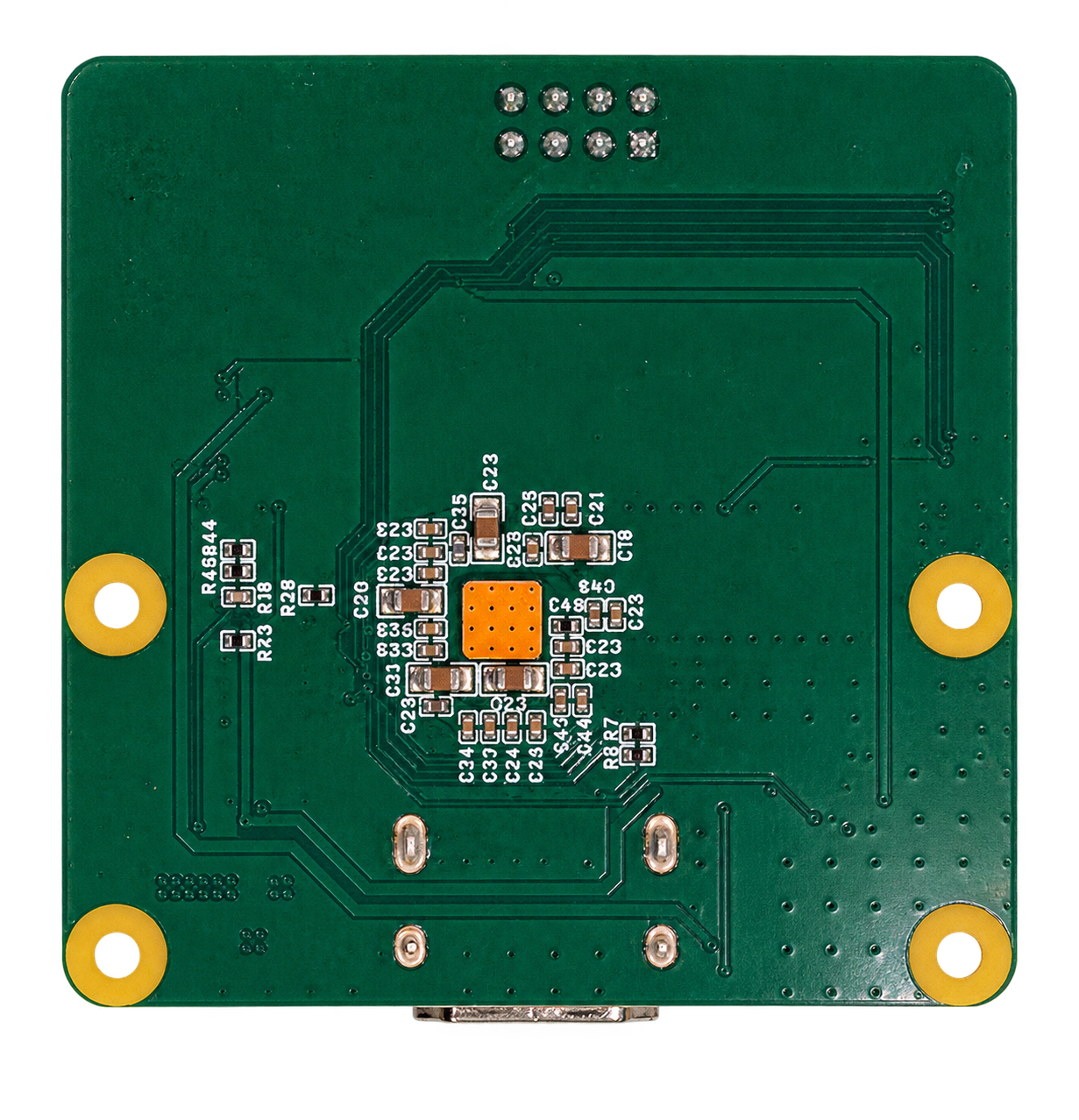
C778 is an HDMI-to-MIPI CSI-2 module based on the Lontium LT6911UXE. It receives HDMI video from computers, game consoles and other sources, sends video to a Raspberry Pi or another embedded host through MIPI0 and MIPI1, and provides digital audio through a separate I²S interface.
C778 supports HDMI input up to 4K (3840×2160) at 60 Hz, including 1080p (1920×1080) at 120 Hz for high-refresh-rate sources. Both MIPI connectors follow the Raspberry Pi 22-pin CSI pinout. The module offers duplicate output by default and an optional left/right split output profile for video capture, embedded vision, video processing and KVM integration.
Product overview · Raspberry Pi 5B guide · RV1126B guide
Key specifications
| Item | Description |
|---|---|
| Main IC | Lontium LT6911UXE, HDMI 2.0 to dual-port MIPI bridge |
| HDMI input | Up to 3840×2160 @ 60 Hz; supports 1920×1080 @ 120 Hz |
| Video output | Two MIPI CSI-2 ports: MIPI0 and MIPI1 |
| Default output profile | Duplicate: both ports carry the same complete image |
| Optional output profile | Left/right split: each CSI path carries half of one input image |
| CSI connectors | Two 22-pin FPC connectors with Raspberry Pi CSI signal order |
| Digital audio | Separate I²S interface |
| Module power | Dedicated 5V input |
| PCB dimensions | 56 × 56 mm; four Ø2.75 mm mounting holes |
Input capability and host capture capability are separate. 4K60 and 1080p120 describe HDMI input. The resolution and frame rate a host can capture, display or encode also depend on the output profile, pixel format, CSI bandwidth and host software. Firmware determines the image carried by each port.
Main IC: LT6911UXE
LT6911UXE is Lontium's HDMI 2.0 to single/dual-port MIPI DSI/CSI bridge. On C778 it receives HDMI, processes the video format, transmits CSI-2 video and extracts HDMI audio to I²S.
Video reception and processing
- HDMI 2.0 receiver: supports 4K60 input and is compatible with HDMI 1.4 and DVI 1.0 signaling. A DVI source requires appropriate cabling and may not carry audio.
- Color processing: the IC supports RGB/YUV color-space conversion and RGB or YUV CSI output. Match the firmware output format to the host driver.
- EDID: integrated EDID storage tells the source which input modes are available. If 4K60 or 1080p120 is absent from the computer's display settings, check the source, HDMI cable and current EDID.
Dual-port MIPI output
Each IC port supports up to four data lanes and one clock lane, with a chip-level maximum of 2.5 Gbit/s per data lane. C778 exposes the two CSI-2 paths through MIPI0 and MIPI1 to duplicate or split the same HDMI image.
These are IC interface capabilities. Actual lane rate and video format depend on the module firmware, board wiring and host receiver. C778 exposes CSI-2 for host video integration.
Audio and control
The IC supports two-channel I²S audio with chip-level sample rates of 32–192 kHz and sample widths of 16–24 bits. Connect C778's I²S signals to the host and configure its audio driver separately.
An integrated microcontroller and firmware storage handle bridge operation. I²C provides status, configuration and firmware-maintenance access. Duplicate/split output and RGB/YUV profiles require matching firmware; changing a host capture resolution alone does not switch these profiles.
IC reference: Lontium LT6911UXE product brief.
HDMI input modes
Typical supported input modes include:
| Mode | Resolution | Refresh rate | Example use |
|---|---|---|---|
| 4K60 | 3840×2160 | 60 Hz | High-resolution desktops and video sources |
| 1080p120 | 1920×1080 | 120 Hz | High-refresh-rate and motion-video capture |
| 1080p60 | 1920×1080 | 60 Hz | General capture and initial integration |
The HDMI source must actually output the selected timing. For 1080p120, select 1920×1080 at 120 Hz on the source. Setting capture software to 120 fps cannot turn a 60 Hz source into a 120 Hz source.
Start with 1080p60 to verify wiring, drivers and colors, then select the target mode. 4K60 input does not mean that every CSI port can carry full 4K60 in every pixel format; determine the output configuration from the selected firmware and host platform.
MIPI0 / MIPI1 output profiles
Both CSI ports originate from one HDMI input. They can carry two copies of a complete image, or one half of the image each.
Duplicate output: the default
In the default profile, MIPI0 and MIPI1 transmit the same complete image. For example, in a compatible 1080p60 configuration, each path carries a complete 1920×1080 image.

- Use either port when only one capture path is needed.
- Use both ports to feed the same content into two receiver paths.
- Do not stitch the two copies together: each is already a full image.
Left/right split output
The split profile divides one HDMI image into left and right halves. Each CSI path carries one half for host-side stitching or separate processing.
For 1920×1080 @ 120 Hz input:
| Image | Resolution and rate |
|---|---|
| Complete HDMI input | 1920×1080 @ 120 Hz |
| Left CSI half | 960×1080 @ 120 fps |
| Right CSI half | 960×1080 @ 120 fps |
| Correctly paired and stitched host image | 1920×1080 @ 120 fps |

The host must receive both paths concurrently. Verify left/right order, colors, timestamps and source-frame alignment to avoid motion discontinuities at the seam. Firmware and wiring determine which MIPI port carries each half.
Choosing a profile
| Item | Duplicate | Left/right split |
|---|---|---|
| Default | Yes | Requires the matching split profile |
| Image per path | Complete image | Left or right half |
| Stitching | Not required | Required for a complete image |
| Host connection | One or both ports | Both ports for a complete image |
| Typical use | Single-path capture or two copies | Distribute transport load across parallel paths |
Match the chip firmware, host drivers, device tree and capture application. Connecting only one cable does not change duplicate output into split output. Increasing one capture node's width cannot restore the missing half of a split stream.
Connectors and power
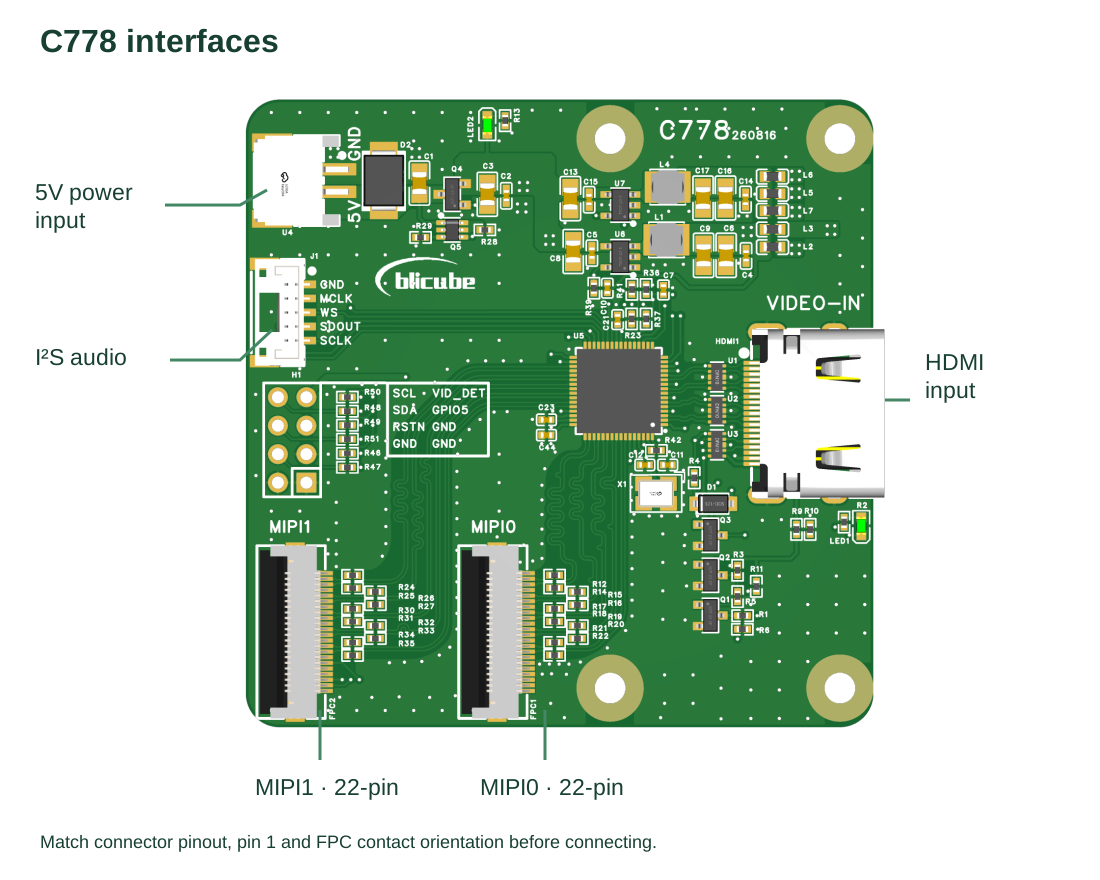
| Connector | Purpose | Connection |
|---|---|---|
| VIDEO-IN | HDMI input | Connect a computer, game console or other HDMI source |
| MIPI0 / MIPI1 | CSI-2 output | Two Raspberry Pi pinout 22-pin connectors; use one or both as required |
| 5V / GND | Module power | Use the supplied lead and check polarity against the silkscreen |
| I²S | Digital audio | GND, MCLK, WS, SDOUT and SCLK; wire for the host audio configuration |
| Control header | I²C, detection and reset | SCL, SDA, RSTN, VID_DET, GPIO5 and GND are exposed on the board |
| Power/input LEDs | Status indication | Confirm actual capture on the host, in addition to LED status |
Power off the host and C778 before inserting FPC cables and locking their latches. Check signal routing and polarity, connect HDMI, then power the module and host.
22-pin MIPI pinout and Raspberry Pi connection
MIPI0 and MIPI1 use the Raspberry Pi 22-pin CSI signal order. Connect compatible hosts using matching 22-pin FPC cables. Both Pi 5 CAM/DISP ports can serve as CSI receivers; the split profile needs both.
Pinout diagram
The diagram follows Raspberry Pi's official 22-pin numbering. Video travels from C778 to the Pi. DN/DP denote the negative/positive signals of a data pair; CN/CP denote the clock pair.

This is a logical pin-order diagram, not a connector top view. Identify physical pin 1 and check the socket contacts and cable orientation at both ends. Do not interpret the diagram's top/bottom as the connector's physical left/right.
Signal assignments
| Pin | Raspberry Pi signal | Function |
|---|---|---|
| 1 | GND | Ground |
| 2 / 3 | CAM_DN0 / CAM_DP0 | Data lane 0, negative/positive |
| 4 | GND | Ground |
| 5 / 6 | CAM_DN1 / CAM_DP1 | Data lane 1, negative/positive |
| 7 | GND | Ground |
| 8 / 9 | CAM_CN / CAM_CP | Clock lane, negative/positive |
| 10 | GND | Ground |
| 11 / 12 | CAM_DN2 / CAM_DP2 | Data lane 2, negative/positive |
| 13 | GND | Ground |
| 14 / 15 | CAM_DN3 / CAM_DP3 | Data lane 3, negative/positive |
| 16 | GND | Ground |
| 17 / 18 | CAM_IO0 / CAM_IO1 | Host auxiliary GPIO; verify the C778 board-side functions |
| 19 | GND | Ground |
| 20 / 21 | SCL / SDA | I²C clock/data |
| 22 | 3V3 | Raspberry Pi 3.3V supply pin |
Reference: official Raspberry Pi 22-pin CSI pinout. Auxiliary names are Raspberry Pi signal names; do not assume CAM_IO0/CAM_IO1 are C778's RSTN or GPIO5.
Cabling and power notes
- Match pin count, pitch, contact orientation and pin 1 at both ends.
- Four-lane operation requires data lanes 0–3 plus the clock pair. A 15-pin adapter cannot provide the same complete four-lane connection.
- Open the latch, fully insert the cable straight, then close the latch. Do not hot-plug FPC cables.
- Power C778 through its dedicated 5V input. Pi CSI pin 22 is 3.3V: never connect 5V to it.
- Check other hosts, including RV1126B boards, against their actual connector pinout even when the pin count matches.
I²S audio connection
C778 exposes HDMI audio through I²S, independently of CSI video.
| Label | Signal | Host connection |
|---|---|---|
| GND | Ground | Common ground |
| MCLK | Master clock | Connect if required by the host audio design |
| WS | Word select / channel clock | Host LRCLK / WS |
| SDOUT | Audio data output | Host I²S data input |
| SCLK | Bit clock | Host BCLK / SCLK |
Configure host pin multiplexing, clock roles, sound card and recording parameters. The HDMI source must send audio. A working video stream does not establish that I²S recording is configured. Match sample rate and width to the source and driver.
Dimensions
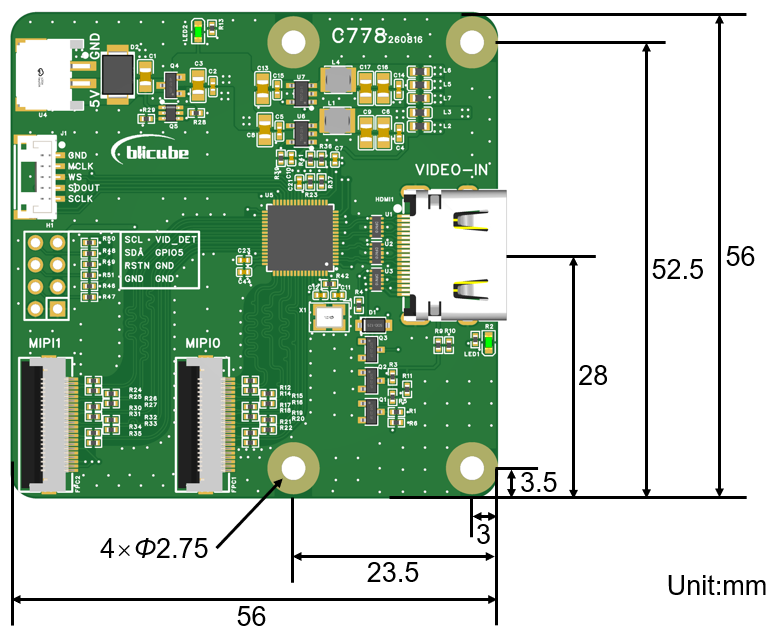
The PCB is 56 × 56 mm, with four Ø2.75 mm mounting holes. Allow clearance for the HDMI plug, power/audio connectors and FPC insertion and bending.
Package contents
- C778 module × 1
- 5V power cable, 15 cm × 1
- 22-pin FPC cable, 15 cm × 2
- I²S cable, 5-position connector with four wires, 15 cm × 1
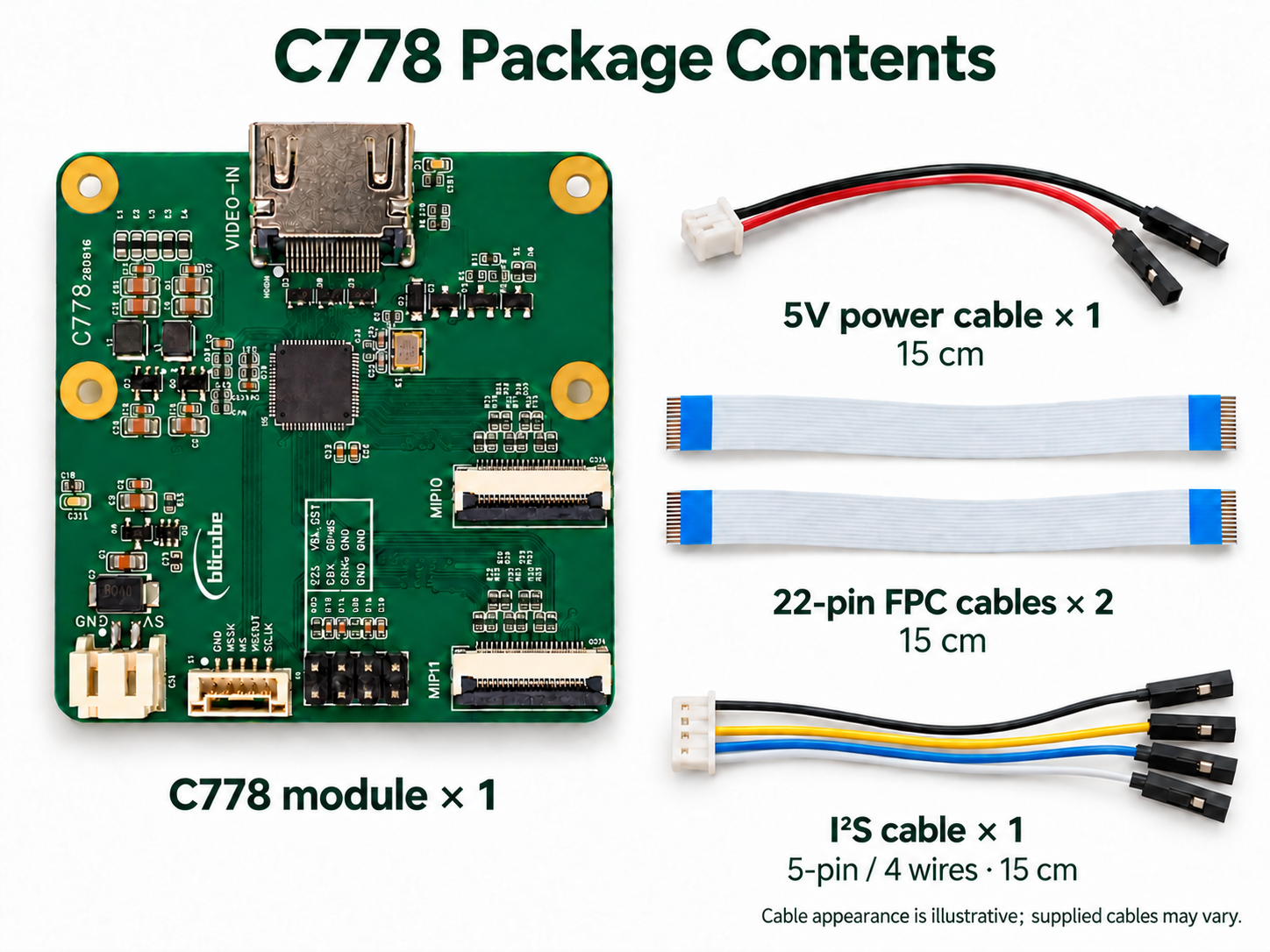
The I²S connector has five positions and four wires. In the orientation shown, from top to bottom: black, empty, yellow, blue, white. The second position is not connected.
Cable appearance is illustrative. Use the connection tables to verify signals rather than inferring a pinout from wire colors. Contents depend on the selected SKU; host boards, HDMI cable and host power supply are separate.
Drivers and platform guides
The host needs a matching LT6911UXE media driver, CSI receiver driver and device tree.
- Raspberry Pi 5B: dual-CSI integration, environment checks, capture and image validation.
- RV1126B: CSI, I²C, I²S and BSP integration using Luckfox Aura as a reference.
Driver source, installer packages and chip firmware downloads are being organized. Firmware must match the board revision and output profile; do not mix duplicate/split or RGB/YUV configurations. Download links will be added to the platform guides when ready.
Frequently asked questions
Can one MIPI connection provide a complete image?
Yes, in the default duplicate profile. Either port carries a complete image. In split mode, one port carries only a half; receive and stitch both paths for a full image.
Can the two ports capture two different computers?
No. There is one HDMI input. Both ports carry copies or halves of the same source.
Why is 4K60 or 1080p120 missing from the computer's display settings?
Check source capability, HDMI cable, input color format and EDID, then select the actual target timing. Capture software's fps setting does not change source timing.
Does 4K60 input guarantee 4K60 host recording?
No. Host capture, display and encoding also depend on CSI format, bandwidth, drivers and application performance. Check input timing, output configuration and host processing separately.
Can it connect directly as a USB webcam?
C778 outputs CSI-2 video. USB UVC output requires an additional host with suitable hardware and forwarding software; a USB cable alone is not sufficient.
What information helps diagnose a missing image?
Provide host model, C778 revision, system/kernel, driver and firmware versions, duplicate/split profile, HDMI timing and wiring photos. Include media topology, capture format and relevant kernel logs to distinguish input, CSI and application issues.